


How to Withdraw Money from Coinbase – Step-by-Step Guide

Coinbase has emerged as a leading global platform for cryptocurrency trading, attracting millions of users worldwide, particularly in the United States. With its significant growth, Coinbase has enabled users to connect their Coinbase accounts with their bank accounts, facilitating seamless transactions.
As a result, in today’s step-by-step guide, we explore the process of withdrawing funds from the Coinbase account, offering all traders valuable insights on how to withdraw funds from their Coinbase account.
How to Withdraw Money from Coinbase Account
While it may seem obvious, it’s important to note that having a bank account is essential for the withdrawal process and for depositing funds into Coinbase. Remember to sell your cryptocurrencies for fiat currencies before withdrawing money from Coinbase.
Before selling or cashing out, it is mandatory to take the following steps:
- Ensure that your mobile app is updated to ensure a smooth transfer.
- Confirm that selling is an available option for your account, using either Coinbase’s Simple mode or Advanced Trade.
- Link a payment method to facilitate the transfer of funds;
- Know your available balance to assess the amount you can sell. The fiat balance and crypto assets are shown in your Coinbase account.
- Review the transaction details, including pricing and Coinbase fees associated with the transaction, to understand the costs involved.
- Remember that your cash may have a short holding period, which could delay immediate cashing out.
- Walk through the identity verification process to ensure your account complies with Coinbase’s security and regulatory measures.
- Coinbase charges users a fee for selling and withdrawing funds, which can vary depending on transaction size, location, network congestion, and others.
Keep in mind that selling crypto for fiat is generally a taxable event in most jurisdictions, so it’s worth tracking your cost basis before you withdraw.
As you’ve taken all the required measures, it’s time to sell your cryptocurrency holdings for money, so let’s get started!
Part I: Sell Your Crypto Assets for Fiat Currency
Mandatory: Sign Up to Your Coinbase Account
Upon signing up, your Coinbase account verification requires identity verification and might take up to 48 hours. As a result, be sure to start the process immediately and then continue with the following instructions carefully.
Also, you’ll need to enable the two-factor authentication for your Coinbase account and provide the authentication code for better security.
Besides these steps, when registering with Coinbase, whether you use Simple mode or Advanced Trade, you will be required to choose a payment method, such as a credit or debit card, besides using your PayPal account. Once you have linked your bank accounts, you can easily make ACH transfers and deposit funds.
Step 1: Navigate to Home Tab
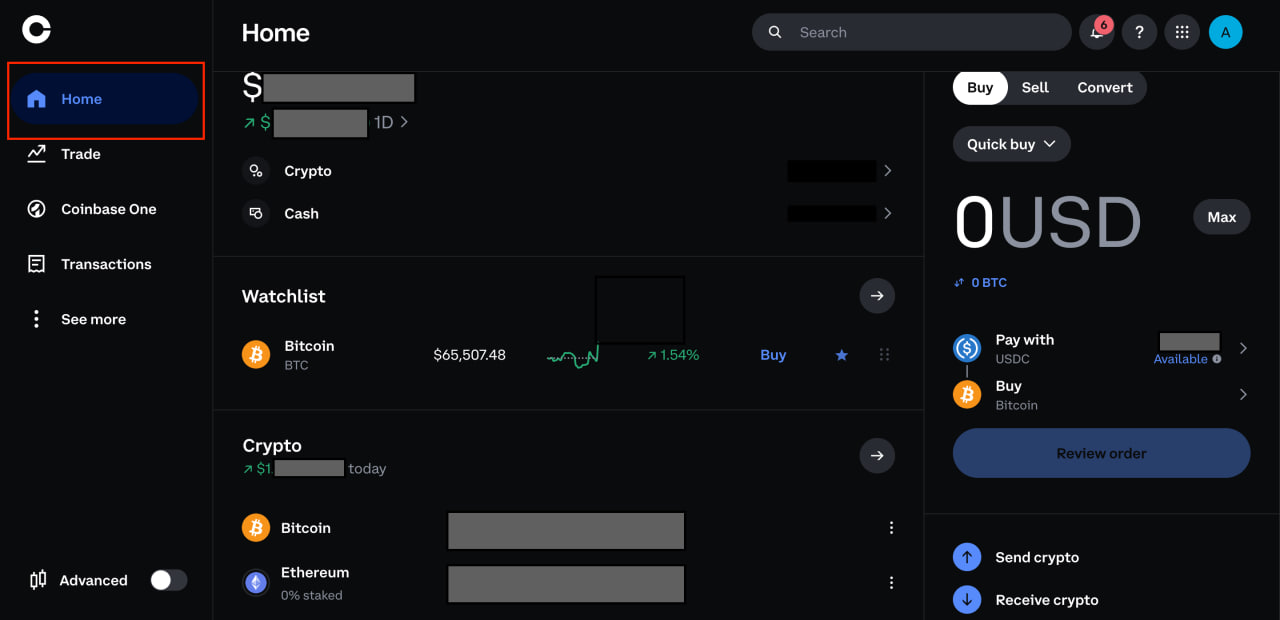
Here, you can view all your available digital assets along with your crypto and fiat balance to withdraw funds with ease.
Step 2: Select the Digital Assets You Wish to Sell
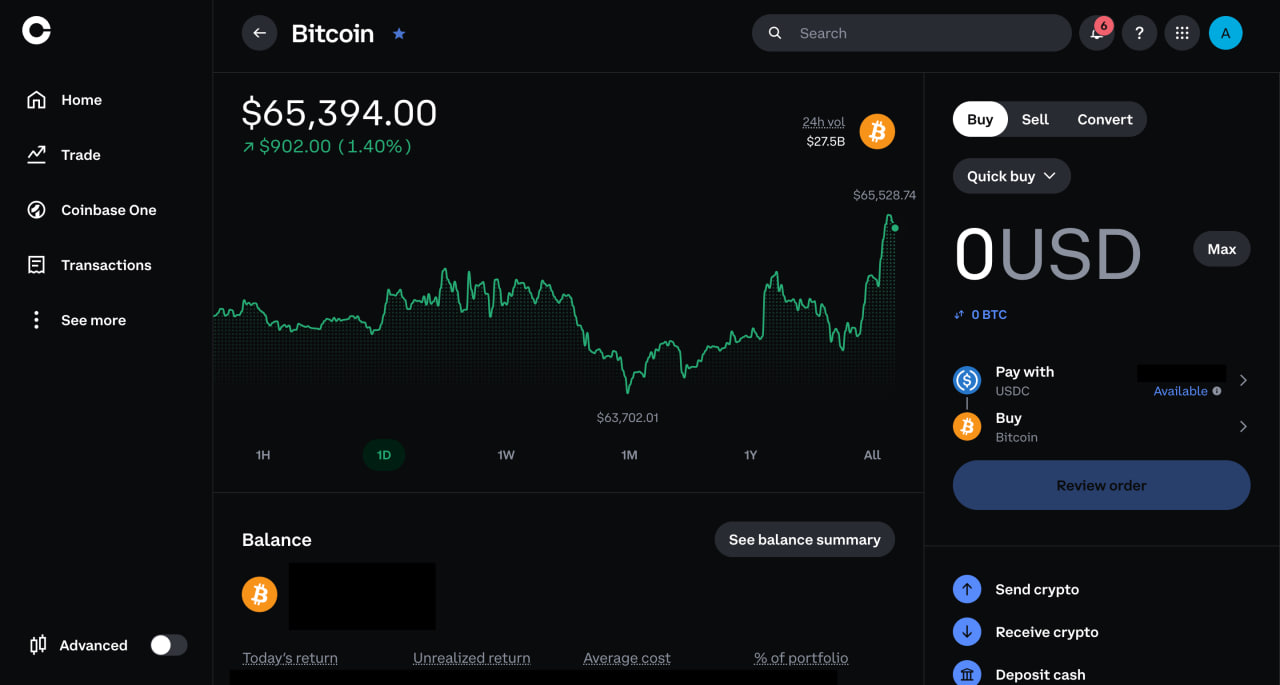
Step 3: Select Sell Option
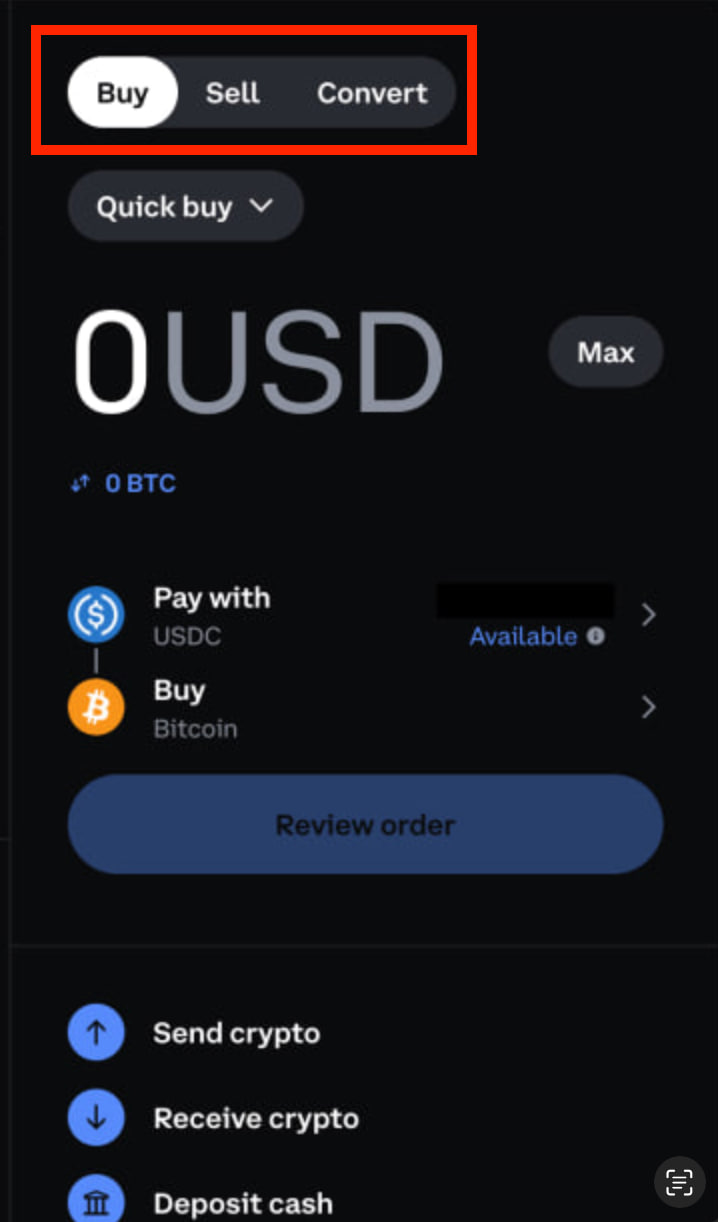
Step 4: Enter the Amount You Want to Sell and Choose The Fiat Currency
Enter the amount you want to sell and select your fiat currency, then continue to review your order.
Step 5. Review Order and Transaction Details, Tap the Sell Now Button to Complete the Transfer
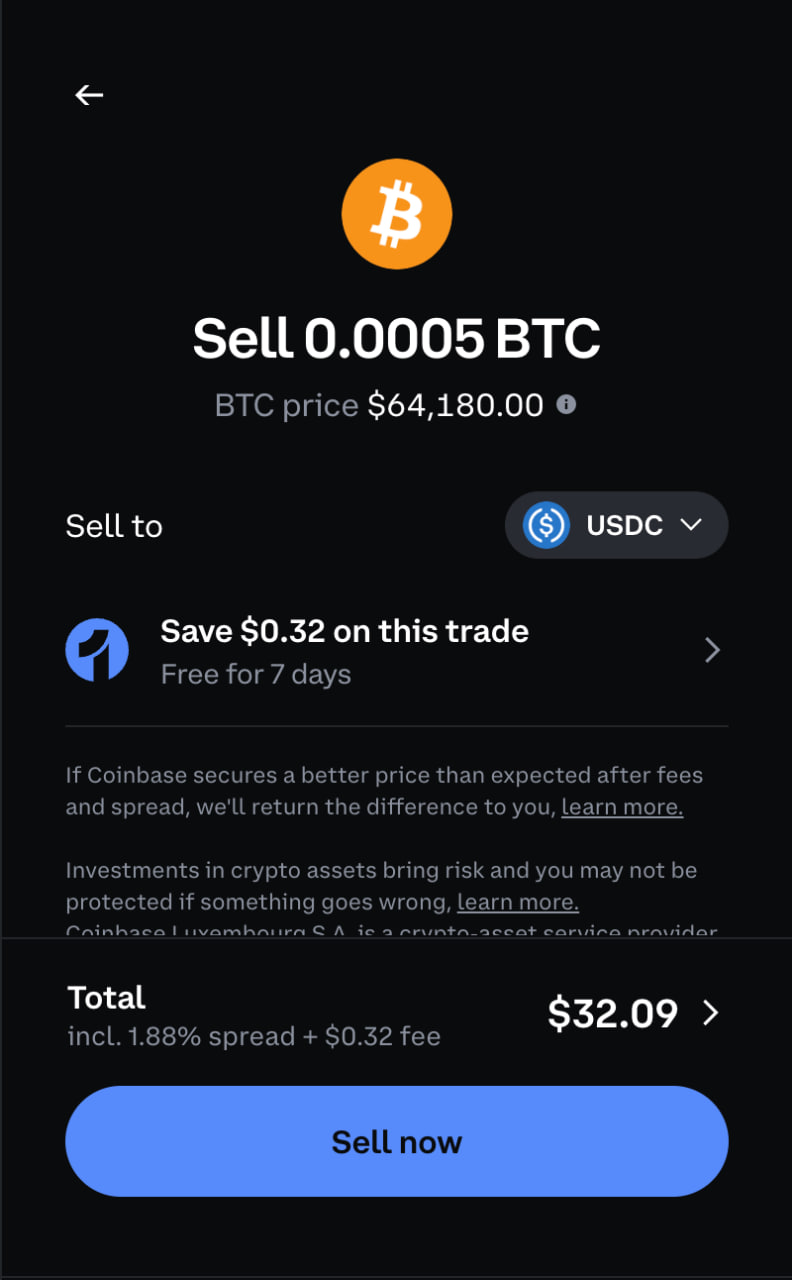
This screen shows exactly what you’re about to sell – the amount, the current BTC price, and where the proceeds are going. Note that “Sell to” may default to a stablecoin like USDC rather than direct fiat currency, depending on your account setup – check this selector before confirming if you specifically want cash rather than a stablecoin balance. Below that, Coinbase shows the total cost breakdown, including the spread percentage and flat fee, before you tap Sell now to complete the trade.
Moving on to the withdrawal process of the funds, withdrawing money from Coinbase is straightforward, although the specific steps may differ between the mobile app and the website.
Part II: How to Withdraw Money From Coinbase in the Browser
Please note that before proceeding with any type of transfer and withdrawal, there are some associated fees and limits, such as the network fee for all cryptocurrency withdrawals. Coinbase sets withdrawal limits based on your verification level, region, and payment method, and will flag it if you try to withdraw above your current threshold. Professional traders using Coinbase Exchange, Coinbase’s separate institutional platform, work with published defaults instead – €100,000/day for SEPA, $100,000/day for Fedwire and ACH, $10,000,000/day for SWIFT wires, and £100,000/day for Faster Payments – but those don’t apply to the standard consumer app.
It is essential to understand that the fees and limits could vary based on various factors, such as the withdrawal method, network congestion, and other influential factors.
Moreover, the USDC withdrawals are free across all supported networks, as Coinbase covers the network fees for all their customer.
Step 1: Navigate to the Home Tab
Same starting point as before – head back to Home. This is the identical screen from Part I, showing your crypto and cash balances in one place.
If you do not observe any fiat assets listed, revisiting the previously outlined process for selling crypto on Coinbase is recommended. Follow these instructions to convert your cryptocurrency into fiat currency before proceeding with the cash-out process.
Step 2: Click on the Fiat Asset You Wish to Withdraw from Coinbase
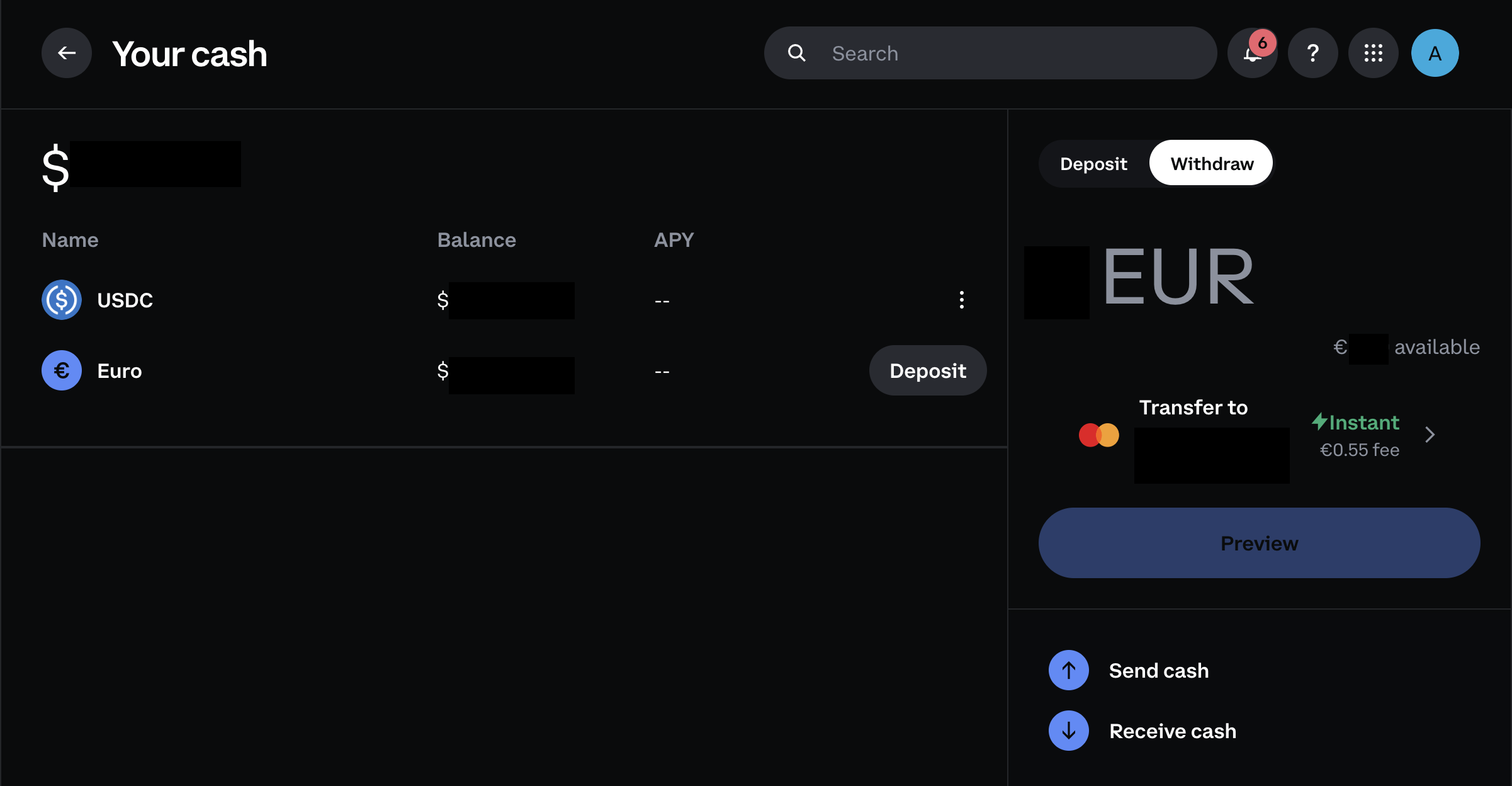
To proceed with the Coinbase platform withdrawal process, you must select the specific asset you wish to withdraw. This can be done by simply clicking on the asset of your choice from the list of available options.
Step 3: Enter the Amount and Choose Your Transfer Method
Enter the amount you want to withdraw, then confirm the payment method shown under “Transfer to.” If you have more than one linked method, tap the arrow to switch between them. If your linked card or account is expired or invalid, Coinbase will flag it here – you’ll need to add or update a payment method before you can continue.
Step 5: Confirm the withdraw
Same as in the Coinbase app withdrawal process, before proceeding with the transaction, tap Preview to review your amount, transfer method, and fee. Ensure the accuracy of all entered data, then confirm on the final screen to complete the transfer.
Part III: How to withdraw from the Coinbase Mobile App
Step 1: Navigate to the Home Tab
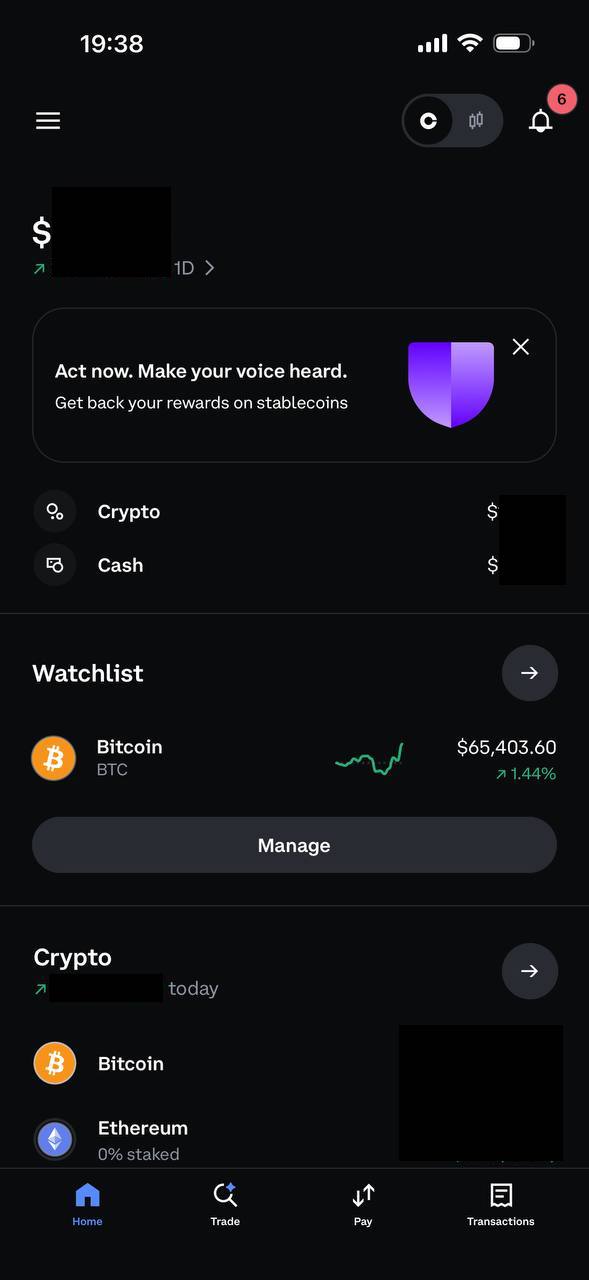
The first step to withdraw on the Coinbase app is to navigate to the Home tab, where you will find your fiat and crypto assets.
If you don’t see any fiat assets listed, you may need to refer back to the previously outlined process for selling crypto on Coinbase. Follow these steps to convert your cryptocurrency into fiat currency before proceeding with the cash-out process.
Step 2: Click on the Fiat Asset You Wish to Withdraw from Coinbase
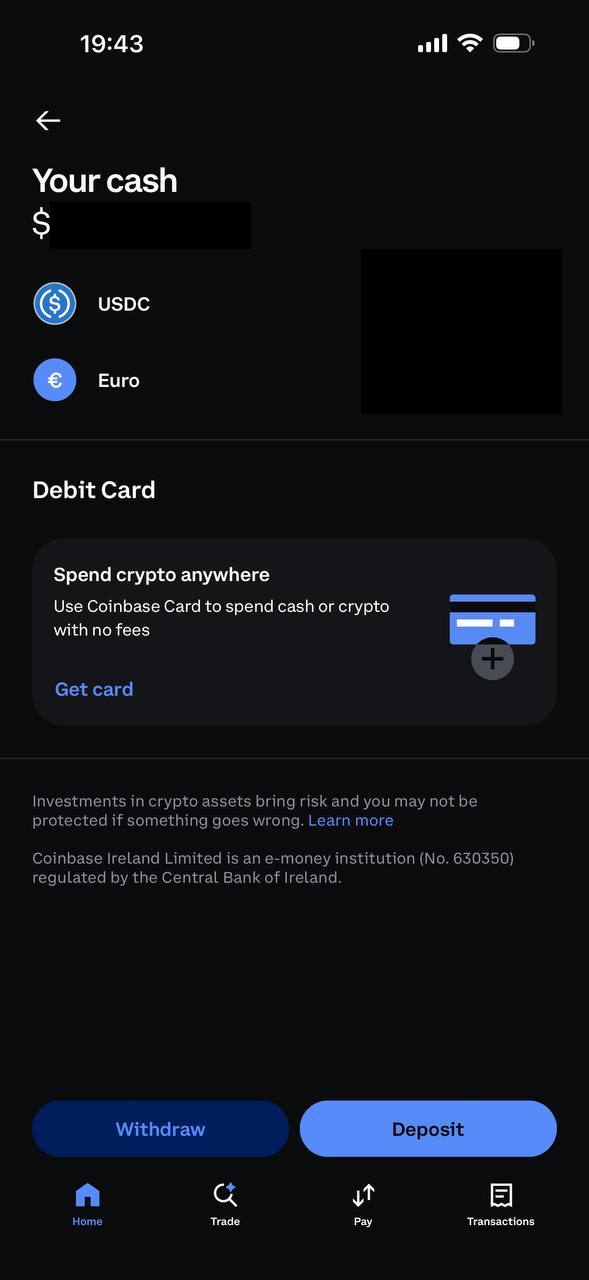
To proceed with the withdrawal process, you need to select the specific asset you wish to withdraw from the platform. Simply click on the asset of your choice.
For example, if you have sold your cryptocurrencies for EUR, click on EUR. In our case, since we sold them for USD, we will select USD.
Step 3: Enter the Amount and Confirm
Enter the amount you want to withdraw and confirm your payment method, the same as on desktop. Review the fee shown before confirming – Coinbase blocks screenshots on this screen for security reasons, so we can’t show it directly, but the flow matches the browser version we covered above.
Enter the desired withdrawal amount from Coinbase into your bank account using the on-screen keyboard.
Additionally, choose the specific bank account where you want the funds to be transferred. This selection can be made based on the payment methods you have previously registered with the platform.
After ensuring the accuracy of these details, proceed by clicking on the “Preview withdraw” button. This will take you to the final step of the process.
Step 4: Review and Confirm
Review the transfer method and fee shown, then confirm to complete the withdrawal. As with the previous step, Coinbase blocks screenshots here for security, so we’re describing this based on the equivalent desktop screen covered in Part II – the layout and information shown are consistent between the two.
Instant Cashouts for Coinbase Withdrawals
Here’s another option to withdraw from Coinbase instantly, yet this option is only available for US, UK, and EU Coinbase traders and investors. As a result, Coinbase users can instantly withdraw from the local currency balance directly to their credit and debit cards.
However, there are some specifications that users must consider, and perhaps contact Coinbase support before instantly cashing out their funds.
- US, UK, and EU customers can use either Visa Fast Funds or MasterCard Send for instant cashouts, though availability can depend on your specific card issuer.
And if you want to see the overview of certain transactions, be sure to hover over the history tab, and there you’ll have all your transfer details.
Note that instant bank cashouts are capped at $100,000 per transaction
Coinbase at a Glance
Coinbase is one of the biggest crypto exchanges worldwide and was the first to go public in the US, via a direct listing on Nasdaq in 2021. Since then, several other crypto exchanges – including Gemini, Bullish, and Kraken – have also listed on public markets, though Coinbase remains the largest by market presence among them. Its story started in 2012, when Fred Ehrsam, Ben Reeves, and Brian Armstrong founded Coinbase with a vision to provide Bitcoin trading services.
What began as a simple interface quickly became the industry’s most widely used cryptocurrency exchange. As a result, Coinbase’s user-friendly platform and easy-to-understand trading features propelled its popularity, making it a trusted choice for any seasoned cryptocurrency trader.
Moreover, what is striking about Coinbase is that it allows for the buying, selling, and withdrawing cryptocurrency, with the option to deposit funds via a debit card or with a linked bank account.
Notably, the platform has lower withdrawal fees and operates as a fully regulated crypto exchange, providing a sense of security for investors. Moreover, if interested, there are some tips and tricks to keep more of your Coinbase profits. This regulatory oversight varies by region and by service – for example, EU cash balances are held through Coinbase Ireland Limited, an e-money institution regulated by the Central Bank of Ireland, while crypto trading for EU users runs through Coinbase Luxembourg S.A., a licensed crypto-asset service provider. Other regions fall under separate Coinbase entities.
Speaking of security, you need to know that since its inception, Coinbase has committed to providing safety and reliability and has further solidified its position as a leading crypto exchange and broker.
Binance still leads by raw trading volume, but Coinbase leads on trust – CoinGecko currently ranks Coinbase among its top three tracked exchanges and gives it the highest Trust Score of any major platform, reflecting its status as a publicly listed, US-regulated exchange.
Coinbase Key Features
- Global Availability – Coinbase operates in over 100 countries and supports more than 250 cryptocurrencies, making it one of the most versatile platforms in the market. It also facilitates fiat currencies like USD, GBP, and EUR.
- Accessibility – Coinbase offers a seamless web browser experience and a dedicated mobile app for iOS and Android devices. This ensures convenient access to the platform from any device, making it a favored choice among crypto investors.
- User-Friendly Account Setup – Setting up an account on Coinbase is a quick and straightforward process that requires just a few minutes and follows six easy steps. The Coinbase official website provides a comprehensive guide along with other valuable resources.
- Fee Structure – Coinbase runs two fee models. The Simple app charges a spread that can range from roughly 0.50% up to 2% or more depending on trade size and market conditions, plus a separate fee that can run up to around 3.99% depending on payment method – smaller trades tend to carry a higher effective percentage cost, since the flat portion of the fee makes up a bigger share of the total. Advanced Trade, the order-book interface built into the same account, charges maker/taker fees between 0% and 0.60% depending on 30-day volume – significantly cheaper for active traders. A Coinbase One subscription can also waive Simple-app fees, and now comes in multiple tiers rather than one flat plan. Additionally, the platform imposes no minimum account balance requirements, allowing users flexibility in managing their funds.
- Coinbase Ecosystem – The Coinbase Ecosystem is complex. It incorporates multiple digital products for individuals, businesses, and developers. As such, anyone can enjoy different robust products, such as the Coinbase Wallet, Coinbase One, the Coinbase Exchange, Coinbase Card, and many others.
FAQ
How Can I Get My Money Out of Coinbase?
To withdraw your funds from Coinbase, you can follow these steps:
- Navigate to the Home Tab;
- Click on the Fiat Asset You Wish to Withdraw from Coinbase;
- Press the Withdrawal Button;
- Enter the Desired Amount, Choose the Bank Account, and Press the Preview Withdrawal Button;
- Confirm the Cash-Out.
Can I Withdraw Money from Coinbase to My Bank Account?
Yes, you can withdraw money from Coinbase to your linked bank account. Before withdrawing your money, you must sell crypto for fiat money, and after that, you must withdraw it from your linked bank account.
Why Can’t I Withdraw Money from Coinbase?
If you’re experiencing difficulty selling or withdrawing from Coinbase, it may be because of regional restrictions, being a new account holder, or incomplete verification.
How Long Does It Take to Get Money Out of Coinbase?
As your local currency resides in your Coinbase account, buying and selling operations are executed instantly. Typically, withdrawing funds to your bank account through SEPA transfer takes approximately 1-2 business days, while wire transfers for cashing out should generally be completed within one business day.
Final Thoughts on How to Withdraw Money from Coinbase
So, withdrawing money from the Coinbase exchange is a straightforward process, mainly when conducted within such a prominent crypto exchange.
However, it’s crucial to consider the fees incurred when trading between different cryptocurrency or cryptocurrency-to-fiat pairs. Also, to ensure a seamless experience, it’s advisable to consult the Coinbase support for the latest information.
Last update: 20.07.2026



Kosta has reported on cryptocurrency markets and blockchain infrastructure since 2020, bringing over six years of hands-on experience in the crypto industry built through daily tracking of markets, trends, and emerging blockchain developments. Specializing in Bitcoin on-chain analysis, institutional ETF flows, and digital asset price action, his work at Coindoo has been cited by other news agencies and consistently covers market developments with a focus on data-driven reporting across Bitcoin, Ethereum, Solana, and XRP. Over the years, Kosta has contributed to multiple crypto media outlets in different regions, authoring over 6,000 articles across the sector. His reporting spans cryptocurrency markets and the broader fintech industry, tracking not only price action but also the technological and regulatory forces shaping the ecosystem. To support his analysis, Kosta actively leverages on-chain data and metrics from leading platforms such as Santiment, Glassnode, and CryptoQuant, enabling deeper, evidence-based market insights. He believes in the power of transparency and the data that underpins the blockchain ecosystem. His academic background in Marketing Management from Denmark further complements his analytical approach, adding a strong understanding of communication strategy and content positioning to his work.