

7 Useful Tips to Keep Your Crypto Wallet Safe
Crypto wallet security depends on who controls the keys, how recovery information is stored, and what a user approves before a transaction. A leaked recovery phrase or an unsafe approval can be enough to lose assets permanently.
This guide explains how crypto wallets work, the threats that matter most in 2026, and seven practical habits that reduce the chance of a costly mistake.
- A wallet controls access; it does not literally hold coins: private keys authorize transactions, while a recovery phrase can restore access to those keys.
- Never share a recovery phrase or private key: no legitimate wallet provider, exchange, or support agent needs either one.
- Common wallet-loss paths involve a human action: a fake website, a compromised account, a malicious approval, or a wrong address can be more dangerous than a technical exploit.
What Does a Crypto Wallet Actually Secure?
A crypto wallet does not store coins in the same way a physical wallet stores cash. Assets remain recorded on the blockchain. The wallet stores or manages the private keys used to authorize transactions, while a recovery phrase can restore access if the wallet app, phone, or hardware device is lost.
That distinction matters because someone who obtains the recovery phrase can usually recreate the wallet elsewhere and move the funds. Someone who loses the phrase without a backup may permanently lose access. The SEC’s retail-custody guidance makes the same point: wallets manage the keys or passcodes that control crypto assets, rather than holding the assets themselves. Read the guidance here.
Self-Custody vs. Exchange Custody
Before choosing security tools, decide who will control the keys. Neither route is risk-free: self-custody gives the user direct control and direct responsibility, while exchange custody shifts key management to a third party and introduces platform risk.
For a broader introduction to setup and wallet types, see Coindoo’s guide to choosing a cryptocurrency wallet. Keep high-value, long-term holdings separate from the wallet or exchange account used for day-to-day activity.
The Main Wallet Threats in 2026
Many wallet thefts do not require an attacker to break a blockchain. They instead try to trick a user into revealing credentials, connecting to a fake site, approving a harmful transaction, or sending funds to the wrong address.
Seven Habits That Protect a Crypto Wallet
1. Protect the Recovery Phrase and Private Keys
Write the recovery phrase down accurately and keep it in a private, secure offline location. Do not take a screenshot, store it in a cloud document, email it to yourself, or give it to a friend, partner, or support agent. Anyone with the phrase may be able to restore the wallet on another device.
Private keys require the same protection. If a page asks for a recovery phrase after you clicked an ad, followed a link, or received a support message, stop. Navigate to the wallet provider through a known official source instead.
2. Keep Long-Term Holdings in a Hardware Wallet
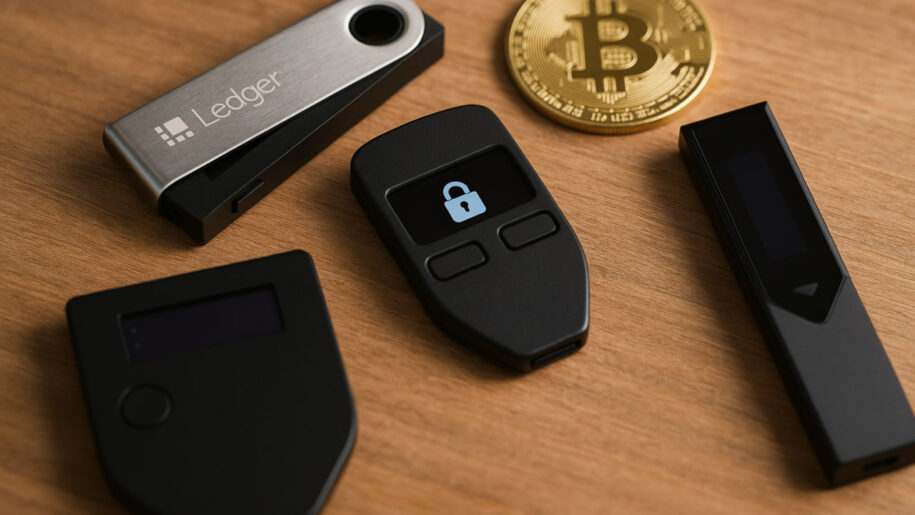
A hardware wallet keeps private keys in a dedicated signing device instead of a browser or phone. This can reduce exposure to online threats for assets that do not need daily access. It is not invulnerable: users must still verify what the device displays before approving a transaction and protect the wallet backup.
Buy hardware devices directly from the manufacturer or an authorized seller. Never use a device that arrives with a recovery phrase already written down or with instructions to enter a supplied phrase. Create a new wallet and recovery phrase yourself during setup.
3. Secure the Email, Exchange, and Mobile Accounts Around Your Wallet
For exchange accounts and the email address used to recover them, use a unique password stored in a password manager. Enable a passkey or hardware security key when the service offers one. An authenticator app is a better fallback than SMS, while text-message codes should be used only when stronger options are unavailable.
This matters because a stolen email account or a SIM swap can be used to reset passwords or intercept recovery codes. CISA ranks hardware security keys and phishing-resistant authentication above app codes, SMS, and email codes, which offer progressively weaker protection. See CISA’s MFA guidance. Adding a PIN or port-out lock to a mobile-carrier account is another useful protection against SIM-swap attempts.
4. Install Wallet Software Only From Verified Sources
Do not search for a wallet and click the first sponsored result. Type a known official domain into the browser, use links from official project documentation, and inspect browser-extension publishers before installing. The same caution applies to exchange apps and portfolio trackers.
Keep the operating system, browser, wallet app, and hardware-wallet firmware updated. Updates can fix known security issues, but an update prompt from a random website or direct message is not proof that the prompt is legitimate.
5. Treat Every Wallet Signature Like a Financial Decision
Signing a transaction is not always the same as sending a visible payment. A token approval can give a smart contract permission to spend specified assets. Other signatures can authorize actions depending on the dApp, so do not sign a request you cannot explain. Inspect the wallet prompt and connected website, then decline a request that is unclear or asks for broader permission than the action requires.
Use a separate low-balance wallet for experimenting with new dApps, mints, or airdrops. Keep the wallet holding long-term assets disconnected from speculative applications. Readers learning how on-chain swaps work can use Coindoo’s Uniswap beginner’s guide alongside this section.
6. Verify the Address, Asset, and Network Before Sending
Crypto transfers are usually irreversible. Compare the full recipient address, asset, and selected network before confirming. Do not rely only on the first and last characters of an address; clipboard malware and address-poisoning scams are designed to exploit rushed checks.
For a large transfer or an unfamiliar network, send a small test transaction first and wait for it to arrive. Coindoo’s guide to wallet addresses explains why a valid-looking address is not enough: it must also belong to the intended recipient and support the correct asset and network.
7. Prepare for Recovery Before You Need It
Before a device fails or goes missing, make sure the recovery backup is readable and complete. Store it offline, privately, and in a way that protects it from both theft and accidental loss.
A recovery plan should be simple enough to follow under pressure. Test it only through the wallet provider’s documented recovery process, never by exposing the phrase to an unknown website or app.
- Long-term assets: hold separately in a hardware wallet that is not connected to unfamiliar dApps.
- Daily on-chain activity: use a separate software wallet with only the balance required for the task.
- Trading balance: secure the exchange account, its recovery email, and its mobile number with strong authentication.
- Every transfer: verify the address, asset, network, and amount before approving it.
What to Do if You Think Your Wallet Is Compromised
If wallet secrets or account credentials may be exposed, act quickly, but do not follow instructions from a suspicious message, pop-up, or direct message. Use a device you trust and navigate to official services yourself.
- If the recovery phrase or private key was exposed: treat the wallet as compromised. Create a completely new wallet with a new recovery phrase and move remaining assets if it is safe to do so. Do not reuse the old phrase.
- If an exchange account may be compromised: change the password through the official site, end other sessions, remove unknown API keys or devices, and contact the exchange through its official support channel.
- If you signed a suspicious approval: stop interacting with the site. Review and revoke unneeded token permissions using a trusted tool for the relevant blockchain. Revoking an approval may limit future token spending, but it does not make a wallet safe if its recovery phrase or private key was exposed; in that case, move funds to a new wallet with a new recovery phrase.
- If a transfer was sent to the wrong place: contact the recipient platform immediately if one is involved, but do not expect a blockchain transfer to be reversible.
Takeaway
The three moments that deserve the most caution are recovery-phrase storage, wallet signatures, and withdrawals. Protecting those points will do more for wallet security than chasing any single app or gadget.
This article is for educational purposes only and is not investment, legal, or cybersecurity advice. Losses from compromised keys, malicious approvals, and blockchain transfers may be irreversible.
FAQ
Can a hardware wallet be hacked?
A hardware wallet reduces online exposure, but it cannot protect a user who reveals a recovery phrase, installs fake software, approves a harmful transaction, or loses the device and recovery backup. It is a strong tool, not a substitute for careful signing and backup practices.
Do I need a VPN to keep a crypto wallet safe?
A VPN may improve privacy on an untrusted network, but it does not stop phishing, malware, a malicious signature, or seed-phrase theft. Strong authentication, verified software, and careful transaction checks are more important wallet protections.
Should I keep crypto on an exchange or in a self-custody wallet?
That depends on whether you want direct responsibility for keys or the convenience of third-party custody. Exchange accounts can be useful for trading, while self-custody can give users direct control. The key is to understand the risks of each approach and avoid keeping more in a hot environment than necessary.
What happens if I lose my hardware wallet?
The device itself is replaceable if the recovery phrase remains secure and complete. Without the device and recovery phrase, however, access to self-custodied assets may be permanently lost.
Can a legitimate support agent ask for my recovery phrase?
No. A request for a recovery phrase or private key is a scam signal. Legitimate support may help with public information, but it does not need the secrets that authorize transactions.



Alexander Zdravkov is a market analyst and crypto journalist with interests in economics, broader financial markets and digital assets. His journey into crypto began more than four years ago, driven by a fascination with the rapid evolution of blockchain technology and the transformative potential of decentralized finance. He began analyzing market cycles and identifying emerging trends before they reach the mainstream. He holds a degree in International Relations - a background that helped shape his broader perspective on global economics, geopolitics, and the interconnected nature of modern financial markets. Whether covering the latest developments in the crypto sector or exploring broader macroeconomic themes, Alexander focuses on giving readers context rather than simply repeating headlines. During his career, he has authored more than 5,000 articles covering cryptocurrencies, traditional finance, and global market developments. His work spans everything from Bitcoin and altcoins to macroeconomic trends influencing risk assets worldwide.